The card counts to 12:00 a.m. on January 1, which is the moment New Year's Eve ends.
New Year dates for this year and next
| Year | New Year's Eve | New Year's Day |
|---|---|---|
| This year | Thursday, December 31, 2026 | Friday, January 1, 2027 |
| Next year | Friday, December 31, 2027 | Saturday, January 1, 2028 |
An 8-week countdown to New Year's Eve
Most New Year's Eve plans go smoother when the big decisions are made by early November. Count back from December 31 and most milestones land on the same calendar dates both years. Only the weekday changes.
| Weeks to go | 2026 date | 2027 date | What to do |
|---|---|---|---|
| 8 | Thu, Nov 5 | Fri, Nov 5 | Decide where you are celebrating and roughly how many guests. Book a venue, restaurant or sitter if you need one. |
| 6 | Thu, Nov 19 | Fri, Nov 19 | Send invitations and ask guests to claim food or drinks. |
| 4 | Thu, Dec 3 | Fri, Dec 3 | Order decorations, party favors and outfits. Pick the midnight moment, such as a toast or a countdown on a big screen. |
| 2 | Thu, Dec 17 | Fri, Dec 17 | Confirm RSVPs. Buy drinks and snacks that keep. Open the countdown on the screen you plan to use and check it works. |
| 1 (week of Christmas) | Week of Mon, Dec 21 (before Christmas) | Week of Mon, Dec 20 (before Christmas) | Keep it to two small jobs: finalize the playlist and pick the games. Skip big prep, since Christmas is the same week. |
| Day of | Thu, Dec 31 | Fri, Dec 31 | Set up by early evening. Start the countdown on screen about ten minutes before midnight. Make any food you held off on during Christmas week. |
How many working days are left before the year ends
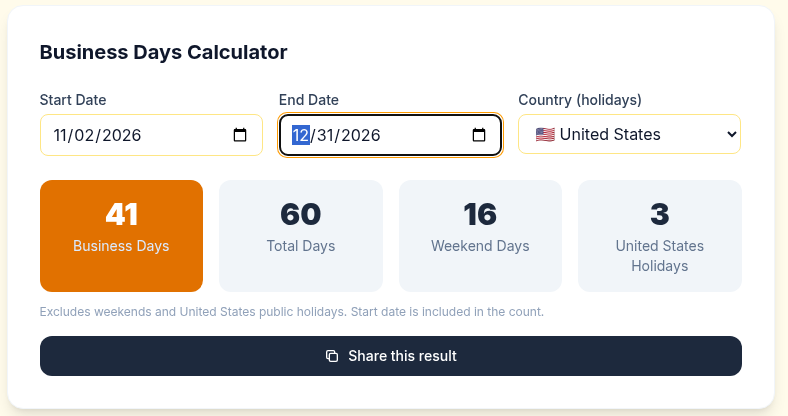
The year-end rush is easier to plan when you count working days, not calendar days. Here is a fixed example you can reproduce: from November 2 to December 31, 2026, the calculator shows 41 business days.
It shows 60 total days, 16 weekend days and 3 holidays. The start date is included in the count, so 60 minus 16 gives 44 weekdays, and 44 minus 3 holidays leaves 41.
This count uses US holidays, since United States is selected in the country menu. The page does not list which three holidays it removed, but Veterans Day (Wednesday, November 11), Thanksgiving (Thursday, November 26) and Christmas Day (Friday, December 25) all fall on weekdays in that range. The country menu also offers United Kingdom and Canada, and the count changes with it.
 Try this example in the calculator
To run the same count for next year, change both dates to 2027 and check the result yourself.
Print a cross-off countdown
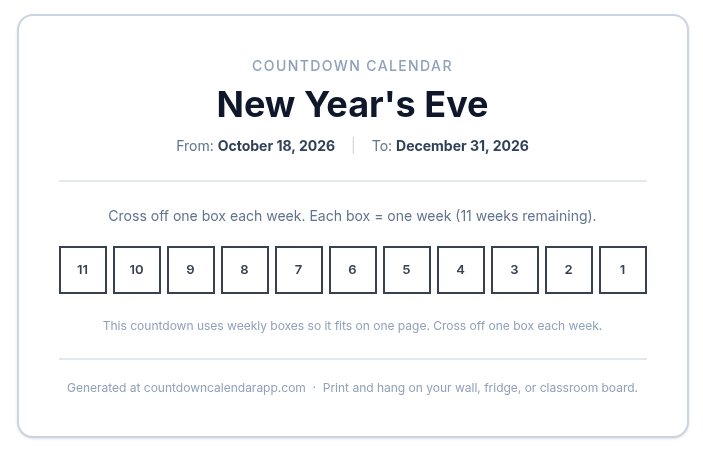
The printable countdown builds a page you can hang on a fridge or wall. Choose the "Custom countdown" tab, type "New Year's Eve" as the event name, pick December 31, 2026 as the target date, and click "Generate custom countdown."
The card shows one numbered box per week, counting down to 1, with the note "Cross off one box each week." The page has no start date field, so it counts from the day you generate it. A countdown that spans 11 weeks, for example, gets 11 boxes on a single page.
The "Print This Calendar" button opens your browser's print dialog.
 Make your printable countdown
Share it or make your own
The Quick Share box on this page has a date field pre-filled with January 1, 2027, and a "Get Share Message" button for sending the countdown to friends and family.
If you want your own design, use the countdown builder. You can set a title, a date and time, a custom message, and a completion message. You can also choose a color or image background, with five gradient presets.
For young kids, set the target to an earlier "midnight," such as 8:00 p.m. on December 31. They get the big moment without staying up.
When you click "Share Timer Only," the builder gives you a view-only link, a QR code and an embed code, with no account needed.
Looking for party ideas by group? Read 10 New Year Countdown Ideas for Every Celebration. To see which places reach midnight first, read First Place to Celebrate New Years.
Quick answers
Can I count down to a time other than midnight?
Yes. In the builder, set the date and time to whatever moment you want, such as 8:00 p.m. for a kids' countdown or 11:59 p.m. for a last-minute check.
How do I see working days left before New Year?
Open the business days calculator and set your start and end dates. It recalculates when you change a date.
Can I put the countdown on another website or send it to friends?
Yes. After you click "Share Timer Only" in the builder, you get a link, a QR code and an iframe embed code.