By Alex Mercer
On December 25 the page shows "Merry Christmas!" and starts counting to next Christmas after midnight.
Christmas dates for this year and next
| Occasion | 2026 | 2027 |
|---|---|---|
| First Sunday of Advent | Sunday, November 29 | Sunday, November 28 |
| Christmas Eve | Thursday, December 24 | Friday, December 24 |
| Christmas Day | Friday, December 25 | Saturday, December 25 |
When to start your Christmas countdown
There is no single right start date. Pick the one that matches how you want to use the countdown.
- December 1. The classic Advent calendar start. You get 24 days to open, cross off or fill, plus Christmas Day. This works well for kids and a paper calendar on the fridge.
- The first Sunday of Advent. November 29, 2026, or November 28, 2027. Choose this if your family or church marks Advent from its first Sunday. For the background on where Advent calendars came from, see the history and benefits of countdown calendars.
- 8 weeks out. October 30 in both years. This suits hosts and anyone with a long gift list, since the countdown doubles as a planning clock.
An 8-week Christmas planning timeline
Counting back from December 25, these milestones fall on the same calendar dates in 2026 and 2027. The plan wraps up the week of December 14, so Christmas Eve stays free.
| Weeks to go | 2026 | 2027 | What to do |
|---|---|---|---|
| 8 | Fri, Oct 30 | Sat, Oct 30 | Decide who is hosting, where, and roughly how many people. Set a gift budget. |
| 6 | Fri, Nov 13 | Sat, Nov 13 | Send invitations or confirm travel. Start a gift list with one line per person. |
| 4 | Fri, Nov 27 | Sat, Nov 27 | Buy gifts that need to ship. Check your carrier's holiday shipping cutoff dates. Pick a December 1 countdown for the kids. |
| 2 | Fri, Dec 11 | Sat, Dec 11 | Plan the Christmas meal and order anything you need to reserve. Wrap gifts already in hand. |
| Final week | Week of Mon, Dec 14 | Week of Mon, Dec 13 | Finish shopping, buy groceries that keep, and confirm plans with guests. |
In 2026, the 4-week mark is the day after US Thanksgiving (Thursday, November 26).
How many working days are left before Christmas
Counting working days helps you plan year-end projects and time off. As a fixed example, from November 2 to December 24, 2026, the calculator shows 37 business days.
It also shows 53 total days, 14 weekend days and 2 US holidays. The start date is included, so 53 minus 14 leaves 39 weekdays, and 39 minus 2 holidays leaves 37. This count uses US holidays, since United States is selected in the country menu. Veterans Day (Wednesday, November 11) and Thanksgiving (Thursday, November 26) are the two weekday holidays in that range. The menu also offers United Kingdom and Canada.
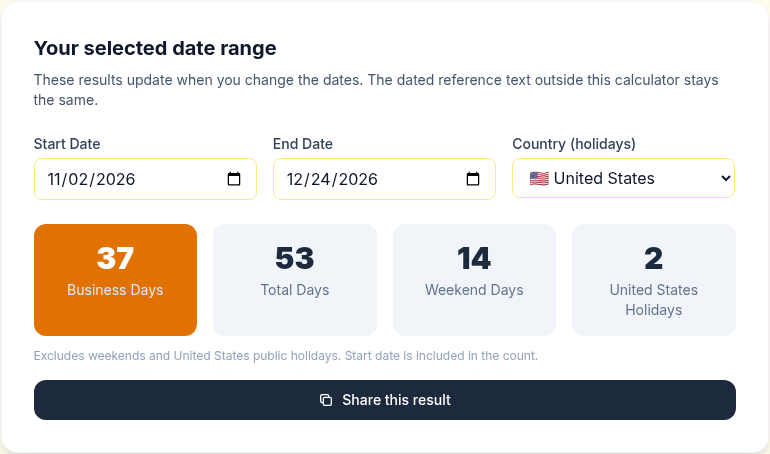
To check your own range, change the start and end dates. The results update as soon as you change a date.
Print an Advent-style countdown
For a December 1 start, the printable Christmas countdown gives you a one-page calendar with 24 boxes labeled Dec 1 to Dec 24 and a larger box for Christmas Day.
Type your own heading in the "Calendar title" field, such as "Our Christmas Countdown", and the sheet updates right away. Then click "Print calendar" to open your browser's print dialog. To keep a digital copy, choose Save as PDF there.
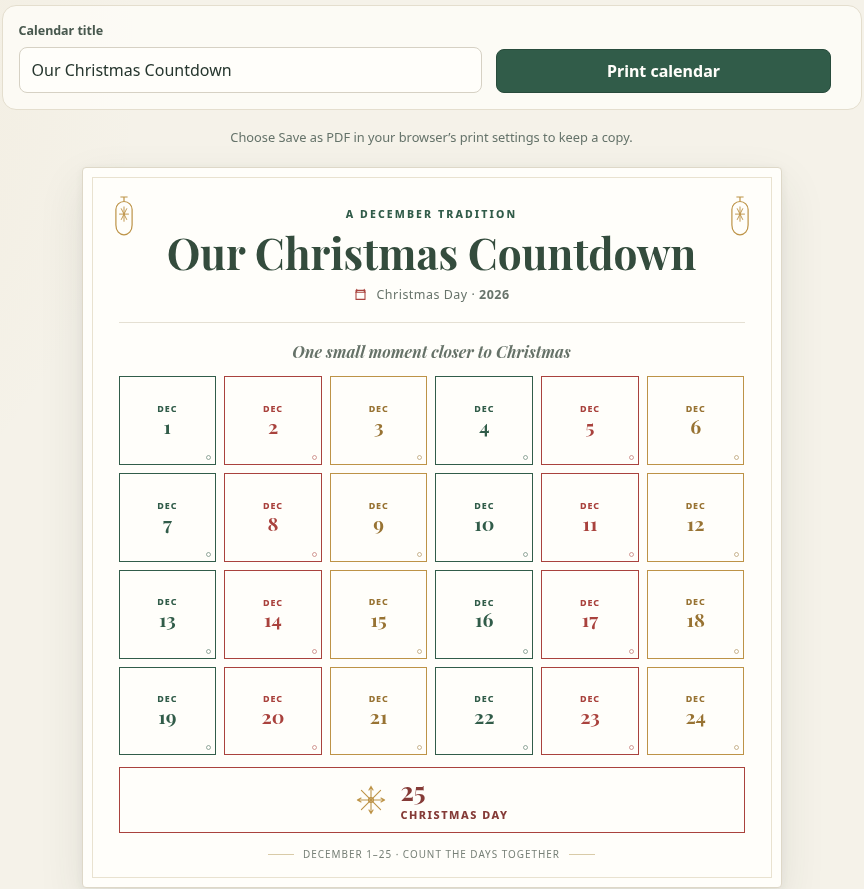
Each box can hold more than a checkmark. Write a small daily activity in it, such as baking cookies or watching a holiday movie.
Share it or build your own
The Quick Share box on this page comes pre-filled with Christmas Day, so you can send the countdown to family in a couple of clicks.
For your own version, open the countdown builder. Set the title to "Christmas Day", the date and time to December 25, 2026 at 12:00 a.m., and add a short message. The preview updates as you type. Pick a background color or upload your own image.
Counting down to the first day of school break too? The winter break countdown guide covers that. After Christmas, the New Year countdown takes over.
Quick answers
How many days until Christmas?
The live countdown at the top of this page shows the exact days, hours, minutes and seconds. It counts to 12:00 a.m. on December 25 in your local time.
Can I share or embed a Christmas countdown?
Yes. Use Quick Share on this page, or make a countdown in the builder. Its "Share Timer Only" option gives a view-only link, a QR code and an embed code.
Do I need an account?
No. The builder and the printable work in your browser without signing in.